
Featured insight
The RentPrompts Marketplace: How to Buy, Sell, and Earn with AI

Palak jain
September 28, 2026•4 min read
#explore rentprompts
The RentPrompts Marketplace: How to Buy, Sell, and Earn with AI
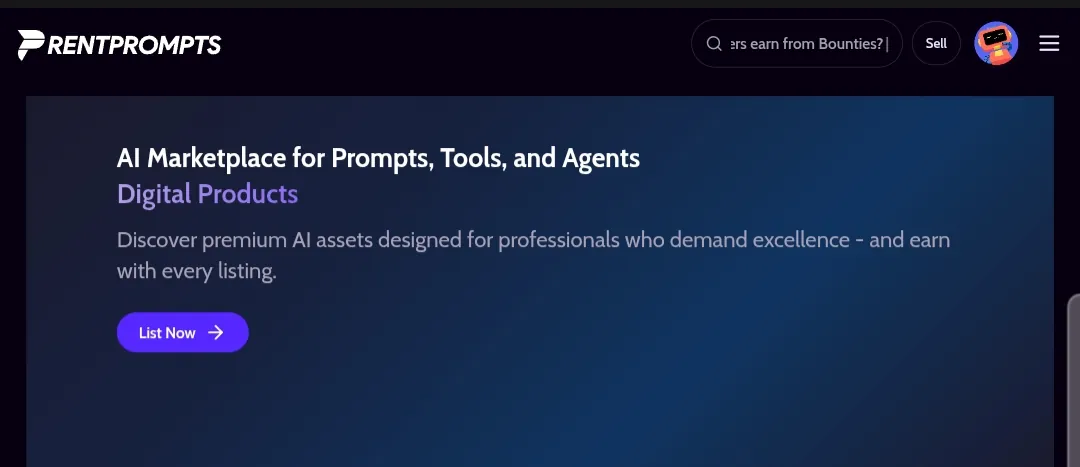
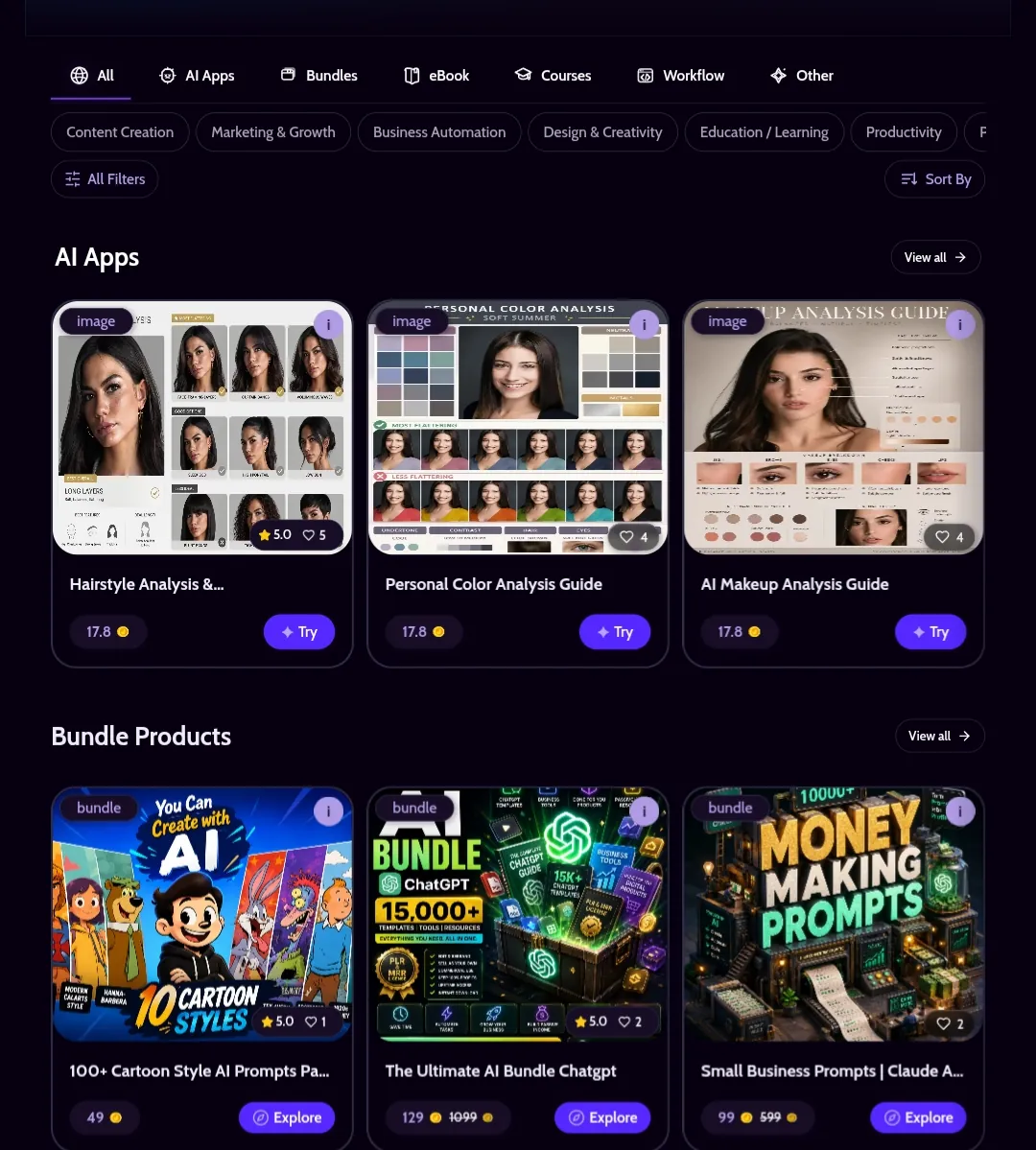
RentPrompts Marketplace homepage showing AI Apps, Bundle Products, and Workflow Products listings
I know a handful of people who wrote a genuinely good prompt once, used it for their own work, and then never thought about it again. That prompt just sat in a notes app doing nothing for anyone else.
The RentPrompts Marketplace is built to solve exactly that problem. It's the part of the platform where a prompt, an AI app, or an agent stops being something only you can use, and turns into something you can sell, and where buyers can find a ready-made solution instead of building one from scratch.
This guide covers how the Marketplace actually works: what you'll find there as a buyer, how listing works as a creator, how the categories and pricing are structured, and what to expect once you start earning.
TL;DR: How Does the RentPrompts Marketplace Work?
- Browse or search listings across categories like AI Apps, Bundles, eBooks, Courses, and Workflows.
- Each listing shows a price in Joules, a rating, and example outputs before you buy.
- Creators list their own prompts, apps, or agents through the "List Now" flow and set their own price.
- Every time a listing sells or gets used, the creator earns Joules, tracked under Analytics in their dashboard.
- Joules convert into real payouts once you're ready to cash out.
- As of writing, the Marketplace has 8,147+ live listings, and RentPrompts has paid out \$233K+ to creators across the platform.
That's the short version. Here's what actually matters at each step.
Why RentPrompts Built a Marketplace at All
Most AI tools stop at generation. You make something, you use it, and that's the end of the story. The Marketplace exists because that's a waste of a lot of good work:
A good prompt is reusable. If a prompt reliably produces great product photography or great ad copy, it doesn't stop being valuable after you use it once. Other people have the exact same problem you already solved.
Not everyone wants to build from scratch. A lot of buyers on the Marketplace aren't looking to learn prompt engineering themselves. They just want a working result, fast, which is exactly what a good listing gives them.
Selling shouldn't require a separate storefront. RentPrompts already knows what you've built inside Generate or its no-code app builder, so turning that into a listing takes a few clicks instead of setting up a whole e-commerce presence, a payment gateway, and an invoicing system.
How to Buy AI Prompts and Apps on RentPrompts
The Marketplace is organized into categories: AI Apps, Bundles, eBooks, Courses, Workflows, and a catch-all Other. You can filter further by use case: things like Content Creation, Marketing & Growth, Business Automation, Design & Creativity, Education, and Productivity.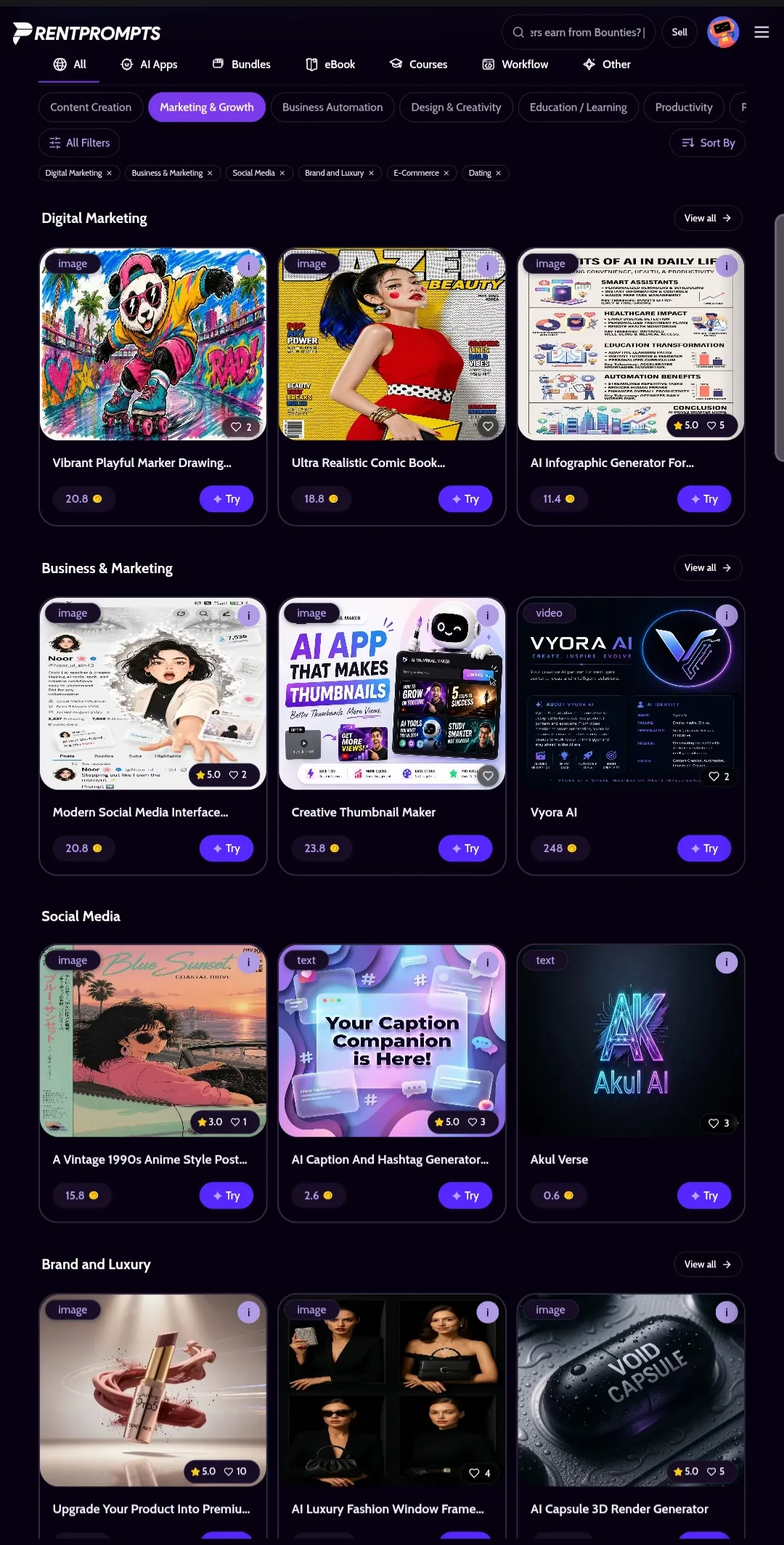
RentPrompts Marketplace category filters showing AI Apps, Bundles, and Workflows
Each listing shows a price in Joules, a like count, and a quick "Try" or "Explore" button depending on the product type. AI Apps tend to be interactive (think a hairstyle analysis tool or a personal color analysis guide), while Bundles are usually a packaged set of prompts or templates sold together at one price.
Clicking into a listing shows the full picture before you buy: a preview of the output, the creator's rating, the price in Joules, and a description of what the prompt or app actually does. Interactive AI Apps also let you customize inputs and generate your own result before committing.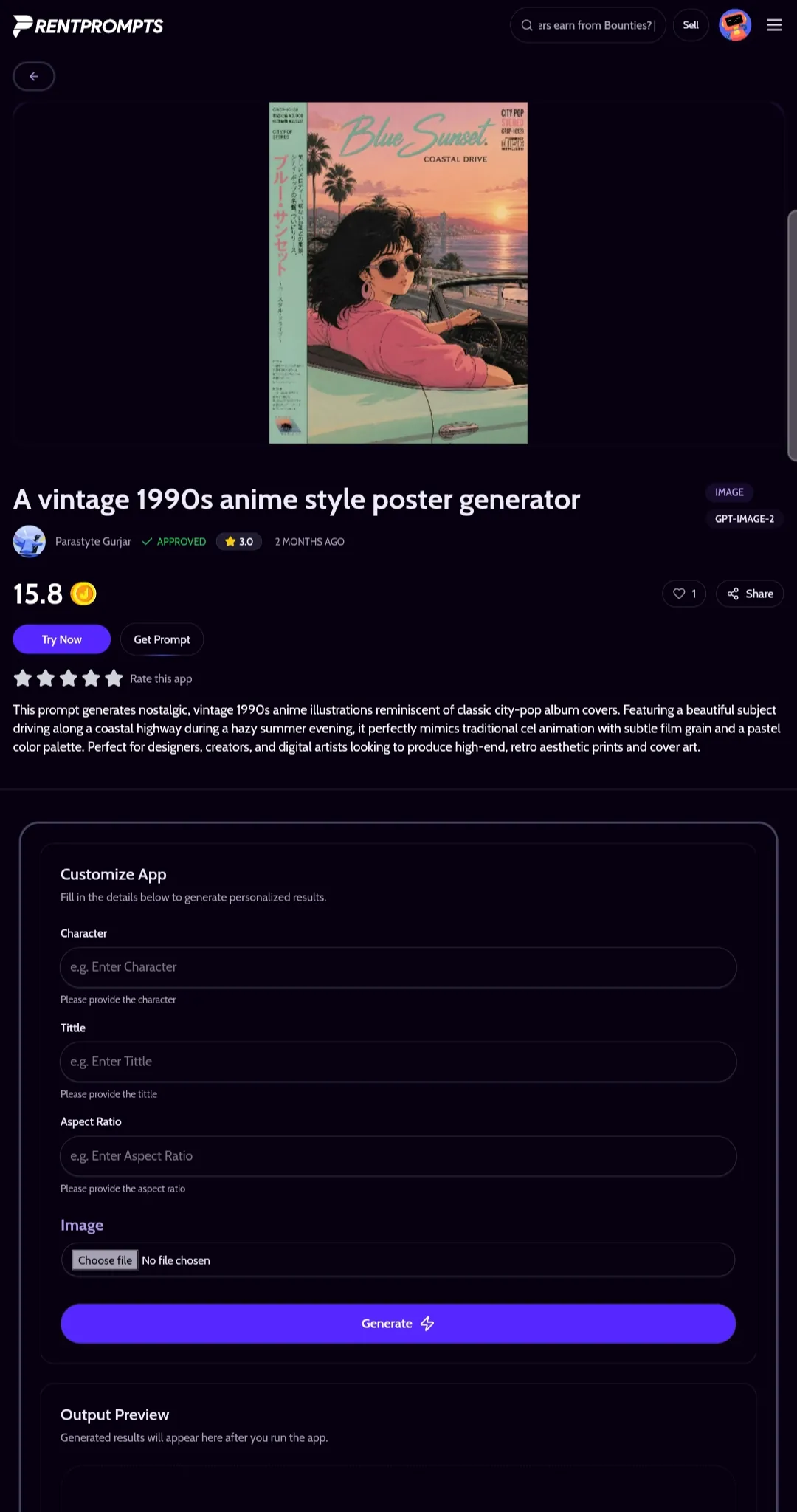
RentPrompts Marketplace individual AI App listing page showing price, rating, and Try Now button
If you're buying, the practical advice is the same as buying anything online: look at the like count and creator rating as a rough signal of quality, and check whether a listing shows real example outputs before you spend Joules on it. I've learned this the hard way, the one listing I regretted buying was the one where I skipped checking the example output and just trusted the title. If you don't yet have Joules in your account, the Pricing page covers how to get them; that process is worth a guide of its own, so this post won't repeat it in detail.
How to Sell AI Prompts on RentPrompts (Step by Step)
If you've built something inside Generate or RentPrompts' no-code AI app and agent builder that consistently works well, the Marketplace is where you turn it into income. I put off listing my first prompt for weeks because I assumed it needed to be perfect before anyone would pay for it. It didn't. It just needed to work reliably and be described honestly.
The process starts with the List Now button on the Marketplace page. From there, you choose which category your product fits (AI App, Bundle, eBook, and so on), set a price in Joules, and add a description along with example outputs so buyers know what they're getting before they pay.
A few things worth knowing before you list:
- Categorize honestly. A prompt bundle listed as an "AI App" will confuse buyers expecting an interactive tool, and that mismatch usually shows up as low ratings rather than refunds.
- Show, don't just describe. Listings with visible example outputs consistently perform better than ones relying on text descriptions alone, since buyers want proof before they spend Joules.
- Price for the value delivered, not just the effort it took you. A prompt that saves a buyer hours of trial and error is worth more than a generic one, even if both took you the same time to write.
- Write your description like a product page, not a caption. State what the buyer gets, what inputs (if any) they need to provide, and what output format to expect.
How Creators Actually Earn
Every time someone rents or runs a listing you've published, Joules land in your account automatically. There's no manual invoicing and no chasing payments. Your dashboard keeps track of everything under Analytics, so you can see which listings are performing well and which ones might need a better description or a price adjustment. The first time I listed something, I watched the Analytics tab obsessively for two days waiting for a sale, that's normal, and it's exactly what the dashboard is there for.
Once you've built up a Joules balance, the Payout section lets you convert it into real money sent to your bank account. This is the same payout system used elsewhere on RentPrompts, so if you've already earned Joules from an AI Games round or a bounty, the process will look familiar. If you haven't tried AI Games yet as another way to build up Joules while practicing prompt writing, RentPrompts' full step-by-step guide covers that separately.
RentPrompts Marketplace, By the Numbers
A few figures worth knowing if you're deciding whether it's worth listing something :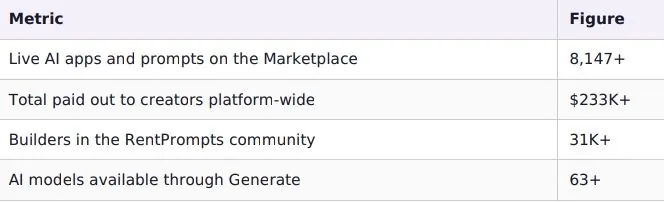
These numbers come from RentPrompts' own published platform stats, so treat them as a reliable snapshot rather than a marketing estimate. RentPrompts doesn't publicly disclose an exact royalty percentage for creators, so avoid quoting a specific number if you're writing about earnings elsewhere; what's confirmed is the total payout figure above.
Quick Tips for Buyers
These are the habits I've picked up after a fair number of purchases, good and bad:
- Check the creator's rating and like count before spending Joules on a listing.
- Prefer listings with visible example outputs over ones relying only on a text description.
- For interactive AI Apps, use the customization fields to test a small input before assuming the tool fits your use case.
- Bundles are usually better value per-prompt than buying individual listings one at a time, if more than one item in the bundle is relevant to you.
Quick Tips for Sellers
And these are the ones I wish someone had told me before I published my first listing:
- Start with one listing you're confident in rather than publishing several mediocre ones at once; a strong first listing builds your rating faster.
- Use accurate category tags. Miscategorized listings get less relevant traffic, not more.
- Revisit your Analytics regularly. A listing that isn't converting is usually a pricing or description problem, not a quality problem.
- Update example outputs if the underlying model changes noticeably, since visitors compare what they see against what they get.
Common Mistakes to Avoid
A few patterns show up again and again with both new buyers and new sellers on the Marketplace:
Buying without checking example outputs
A listing with no visible sample result is a gamble. If a seller hasn't shown what their prompt or app actually produces, treat that as a signal to look further before spending Joules.
Listing before testing thoroughly
A prompt that worked well once in Generate isn't automatically reliable across different inputs. Run it a handful of times with slightly different inputs before publishing, so your example outputs actually reflect what a buyer will get.
Underpricing out of hesitation
New sellers often price too low, assuming a lower price means more sales. In practice, a well-described, clearly valuable listing at a fair price tends to outperform a suspiciously cheap one, since buyers read a very low price as a signal of low quality. I underpriced my first listing because I assumed cheap meant more sales. It didn't move until I raised the price and rewrote the description, that's when I understood why the pattern above is real.
Ignoring your Analytics dashboard
A listing that isn't selling is giving you information. Low views usually point to a categorization or discoverability problem; views without sales usually point to a description or pricing problem. Treat the dashboard as a feedback loop, not just a running total.
Copying a competitor's exact framing
Two nearly identical listings competing on the same search terms usually both underperform compared to a single, clearly differentiated one. If a category already has a strong listing similar to yours, focus your description on what makes yours specifically different.
Advantages and Limitations
Advantages
- Turns one-time work into repeatable, passive income
- No separate storefront, payment gateway, or invoicing system needed
- Built-in categories and filters mean buyers can actually find your listing
- Works for more than just prompts --- apps, agents, bundles, and courses are all sellable
Limitations
- A crowded category still means visibility depends on a genuinely useful, well-described listing
- Payouts convert from Joules to real money, so there's some platform overhead vs. being paid directly
- Ratings and like counts take time to build --- early listings may not sell immediately even if good
- The exact ranking logic behind what gets surfaced first in a category isn't publicly documented
Frequently Asked Questions
1. Do I need an audience to sell on the Marketplace?
No. Unlike selling through your own social media, the Marketplace already has buyers browsing by category, so a well-described listing can get discovered without you needing an existing following.
2. What can I actually sell?
Prompts, AI apps, agents, bundles, eBooks, courses, and workflows are all supported categories on the Marketplace.
3. How do I get paid?
You earn Joules automatically whenever someone rents or runs your listing. Joules can be converted into real payouts sent to your bank account from the Payout section of your dashboard.
4. Can I sell something I built with the no-code agent builder?
Yes. Anything built inside Generate or RentPrompts' no-code AI app and agent builder can be listed on the Marketplace once it's ready.
5. Is there a fee for listing something?
Listing itself doesn't require an upfront payment; you set your price in Joules and earn from actual usage rather than paying to list.
6. How is this different from earning Joules through AI Games or bounties?
AI Games and bounties reward you for playing or completing a specific challenge. The Marketplace pays you repeatedly for something you built once, every time someone else uses it. RentPrompts' dedicated AI Games guide covers that path in detail if you want to explore it alongside selling.
7. What happens if my listing gets a bad rating?
Like any marketplace, ratings are visible to buyers and affect discovery over time. Miscategorizing a listing or overpromising in the description are the most common reasons for a poor rating, both of which are avoidable with an honest, specific listing page.
Conclusion
The Marketplace is what turns RentPrompts from a place where you make things into a place where making things can actually pay you. Buyers get a working solution without having to build it themselves, and creators get a way to earn from work they'd otherwise only use once. With over 8,000 live listings and more than \$233K already paid out to creators, it's a big enough market to be worth a serious first listing rather than a one-off experiment. That prompt sitting in my notes app eventually became my first listing, and it's still earning Joules months later.
Ready to explore or list something of your own? Visit the RentPrompts Marketplace
0 Comments

No comments yet. Be the first to start the discussion!