

Featured insight
Say What You See Game on RentPrompts: Review and Tips

YASHWINI PATIDAR
September 24, 2026•4 min read
#explore rentprompts
Say What You See on RentPrompts: Practice Prompt Writing
TL;DR
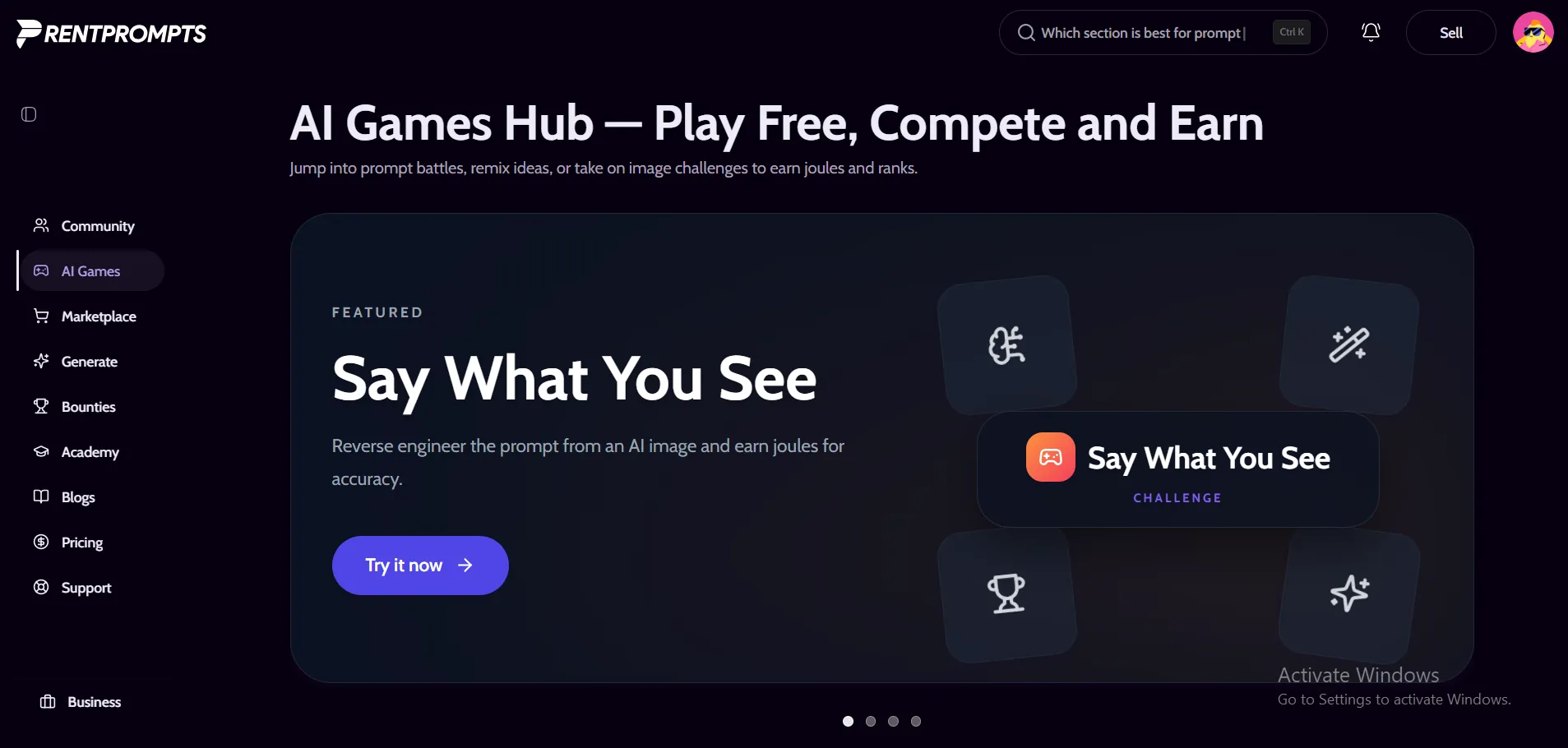
- Say What You See is an AI image prompt game on RentPrompts. You study an AI-generated image, write a prompt to recreate it, and earn joules based on how close your image looks.
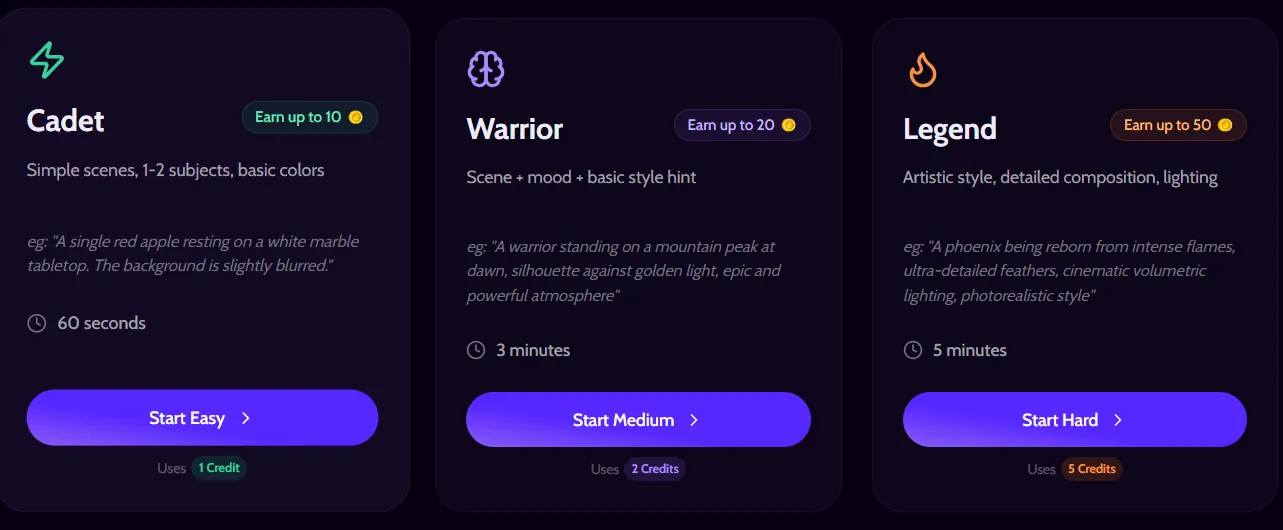
- There are three levels: Cadet (60 seconds, 1 credit, up to 10 joules), Warrior (3 minutes, 2 credits, up to 20 joules) and Legend (5 minutes, 5 credits, up to 50 joules).
- You do not need to guess the original wording. Describing what is visible matters more, and subject, context and style is a good order to follow.
- Extras include 11 image categories, a Daily One-Image Challenge, a leaderboard and a 10-day streak bonus of +5 joules per round.
- Limits: rounds use credits, the timers are tight, and the game page does not explain how similarity is scored.
Introduction
I tried Say What You See for the first time on rentprompts.com, and I had a great experience. I opened it expecting a five-minute distraction. I stayed longer than planned, mostly because every round showed me how much I skip when I describe a picture.
Most prompt practice goes in one direction. You have an idea, you type it, and you see what the AI gives you. Say What You See flips that. The image comes first, and you work backward to the words. That one change makes you notice colors, light, angles and backgrounds that are easy to skip otherwise.
A quick note on scope: this post is only about this one game. For the platform-wide walkthrough, including the AI Games hub and how the other games work, read the RentPrompts guide, How to Play AI Games on RentPrompts: The Complete Step-by-Step Guide (2026). Here I cover how Say What You See works, what helps you score better, what goes wrong, and where the game has limits. You can also browse every game from the AI Games hub.
Say What You See, Explained in Simple Terms
The idea in one minute
Think of it as a reverse prompt game. The game shows an AI-generated image. You write the text prompt you think could recreate it. The game then generates an image from your prompt, and the joules you earn depend on how close that image looks to the original.
That last part matters. The game page says you earn joules based on how close your image looks. It does not say you must match the original wording. So you are not guessing a hidden sentence. You are describing what matters visually: the subject, the setting, the colors, the mood and the style. Two very different prompts can produce similar images, and the game rewards the image, not the words.
The three levels
Each level has its own time limit, credit cost and reward ceiling, as listed on the game page. Every level card also shows a sample prompt. The Cadet sample describes a single red apple on a white marble table with a blurred background. The Warrior sample describes a warrior on a mountain peak at dawn, in silhouette against golden light. The Legend sample describes a phoenix rising from flames with fine feather detail, cinematic volumetric lighting and a photorealistic finish.
| Level | Time limit | Credits per round | Max joules | What the level asks for |
|---|---|---|---|---|
| Cadet | 60 seconds | 1 | 10 | Simple scenes, 1 to 2 subjects, basic colors |
| Warrior | 3 minutes | 2 | 20 | Scene, mood and a basic style hint |
| Legend | 5 minutes | 5 | 50 | Artistic style, detailed composition, lighting |
Table 1: Levels at a glance. Source: the game page.
The numbers on the page also allow a little arithmetic. This is my own calculation, not something the page states, and it only compares the two numbers because the page does not say whether a credit and a joule are the same unit. It also assumes a top score.
| Level | Max joules per credit spent | Max joules per minute of time limit |
|---|---|---|
| Cadet | 10 | 10 |
| Warrior | 10 | 6.7 |
| Legend | 10 | 10 |
Table 2: What the level numbers imply (derived from Table 1).
Two things stand out. The best-case reward per credit is the same on every level, so Legend is not better value, it just asks for more detail. And Warrior offers the lowest reward for each minute it allows. If you play for practice rather than for joules, that hardly matters. It is still useful to know before you choose a level.
Categories, Daily Challenge, leaderboard and streak
You can filter rounds by category. The page lists Nature, Architecture, Abstract, Portrait, Fantasy, Art, Food, People, Animals, Space and Technology, plus an All option. There is also a leaderboard and a streak counter on the page.
| Feature | What the page says |
|---|---|
| Categories | 11 categories plus All |
| Daily One-Image Challenge | Same image for everyone, one shot, top 3 win joules at midnight |
| Streak bonus | Build a 10-day streak to earn +5 bonus joules on every round |
| Leaderboard | Shown on the page, with a countdown to when it closes |
Table 3: Quick facts about the extras. Source: the game page.
The Daily One-Image Challenge has its own page. Because you only get one shot, it works better as a test than as practice.
What works well
- Fast feedback. A round takes one to five minutes, so you can run several in a sitting and see what changes.
- A clear ladder. Cadet, Warrior and Legend add mood, style and lighting step by step, so you always know what to practice next.
- Targeted practice. Category filters let you go after a weak spot, such as Portrait or Architecture, instead of playing random rounds.
- It trains observation. Writing a prompt from a finished image forces you to name what you see, which is the core habit behind most good image prompts.
Where it falls short
- It costs credits. Each round uses 1, 2 or 5 credits, so heavy practice adds up.
- The timer is strict. Sixty seconds on Cadet leaves little room to think, which can frustrate beginners.
- Scoring is not explained. The page says joules follow how close your image looks, but it does not describe the method, so you cannot tell exactly why one prompt scored higher than another.
- Image models can vary. In general, an image generator may return different results for the same prompt, so a good prompt will not always earn the same score.
- Images only. The game trains image prompts. Prompts for text, code or analysis follow different rules, although the habit of being clear carries over.
Why it helps with real prompt work
Google's Imagen prompt guide says a good prompt is descriptive and clear, and it suggests starting with subject, context and style. It also stresses iteration: set the core idea first, then refine. A separate Google post on Gemini image prompts lists six elements: subject, composition, action, location, style and editing instructions. Say What You See lets you rehearse most of those under time pressure.
If you want the theory behind the practice, the AI Academy offers prompt engineering courses, self-paced video lessons, mentor office hours and project work, according to its page. RentPrompts has also written about learning prompt engineering through games if you want another view on the idea.
Hidden Tricks
- Follow a fixed order. Google's Imagen guide suggests subject, context and style. Google Cloud's Nano Banana prompting guide gives a similar formula: subject, action, location, composition, style. Pick one and use it as a checklist every round. When the timer is running, a checklist stops you from staring at the image and typing nothing.
- Read the level example first. The Cadet sample is one short sentence with one subject. The Legend sample stacks a subject, fine detail, lighting and a finish. That gap shows how much detail each level expects.
- Get the core idea down first, then add. Type the subject and setting in the first ten seconds. Use the remaining time for color, light and style. If time runs out, you still have the most important part.
- Describe position and color, not feelings. Words like "beautiful" or "sad" give an image generator very little. "Red apple in the center, white marble table, soft blur behind" gives it a lot. Save mood words for Warrior and Legend, where the level asks for mood and style.
- Name the light. Lighting changes an image more than most people expect. The Legend sample uses cinematic volumetric lighting. When the picture shows it, try words such as backlit, golden hour, soft window light or hard shadows.
- Pick the right medium word. Google's guide says styles can be general (painting, photograph, sketch) or specific (pastel painting, charcoal drawing, isometric 3D). If the image looks like a camera shot, say photograph. If it looks flat and colorful, try illustration.
- Practice one category at a time. If Food or Space rounds keep going badly, filter to that category and repeat it. Repeating one type of image helps you spot the details it needs, such as surface texture in food or glow in space scenes.
- Warm up before the Daily Challenge. You get one shot, so play a normal round first. It gets you into a describing mindset before the one attempt that counts.
- Test phrases outside the game. If you want to see how one phrase changes an image, the Generate section lists image models such as Nano-Banana. Check the Pricing page first, since generating images may use credits.
Common Mistakes
- Treating it as an exact-wording quiz. The game rewards how close your image looks, so you do not need the original prompt word for word. Chasing exact phrases wastes time. Describe the picture instead.
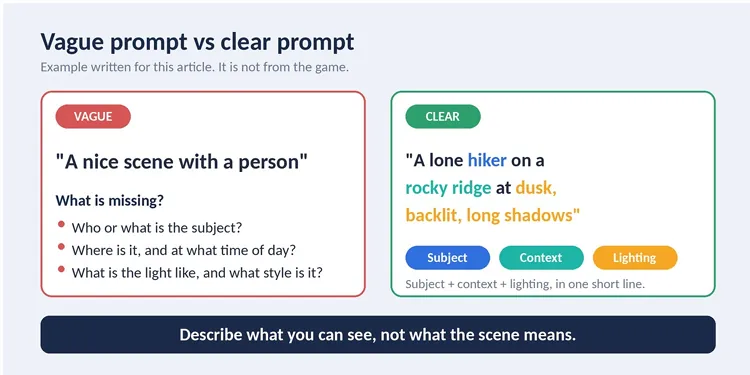
- Writing a story instead of a description. "A tired traveler who has walked for days" is a story. "A lone hiker on a rocky ridge at dusk, backlit, long shadows" is a picture. The generator can only draw what you can see.
- Skipping lighting and mood on Warrior and Legend. Those levels ask for mood, style and lighting. If your prompt only lists objects, you leave the biggest visual clues out.
- Jumping to Legend too early. Legend uses 5 credits and gives you 5 minutes. If your basics are shaky, you pay more to learn the same lesson. Start at Cadet and move up.
- Packing too much into Cadet. Cadet gives 60 seconds and shows one or two subjects with basic colors. A long prompt full of small details can bury the main subject.
- Never reviewing misses. After a round, compare your result with the original and note what you missed: color, angle, background or style. One note per round is enough, and patterns show up quickly.
- Treating the Daily Challenge like a warm-up. It is one shot per image for everyone. Warm up somewhere else.
For mistakes that apply to prompts in general, see the RentPrompts post on common mistakes in writing prompts and how to avoid them.
Comparison Table: Guessing Prompts Manually vs Using Say What You See
Here is how practicing on your own compares with using the Say What You See platform framework.
| Factor | Guessing prompts manually | Say What You See |
|---|---|---|
| Feedback | You judge the result by feel | The game generates an image from your prompt and awards joules by how close it looks |
| Starting point | Any image you find, with no known target | An AI-generated image chosen for the round, so there is a clear target |
| Time pressure | None | 60 seconds, 3 minutes or 5 minutes, by level |
| Difficulty steps | You set them yourself | Cadet, Warrior and Legend, with a sample prompt on each card |
| Variety | Depends on your sources | 11 categories plus All |
| Motivation | Self-driven | Leaderboard, Daily Challenge and a 10-day streak bonus |
| Cost | No platform cost | 1, 2 or 5 credits per round |
| Scoring detail | You know your own criteria | The page does not explain the scoring method |
| Best for | Slow, deep study of one image | Fast, repeatable practice |
Neither approach replaces the other. Manual practice is better when you want to study one image for a long time. The game is better when you want a quick, repeatable routine with a score attached.
FAQ
What is Say What You See on RentPrompts?
It is a prompt engineering game in the AI Games section. The game shows an AI-generated image, you write a prompt to recreate it, and you earn joules based on how close your generated image looks. You can play it on the Say What You See page.
Do I have to guess the exact prompt?
No. The page says joules depend on how close your image looks, not on matching the original words. Focus on describing the subject, setting, colors, light and style.
How much does a round cost?
Cadet uses 1 credit, Warrior uses 2 and Legend uses 5, according to the level cards. The page's own summary calls the game free to play, but the cards list a credit cost, so check the Pricing page for how credits work. If you run low, Recharge is in the top menu.
How many joules can I earn per round?
Up to 10 on Cadet, up to 20 on Warrior and up to 50 on Legend. The exact amount depends on how close your image looks. A 10-day streak adds +5 bonus joules on every round.
How is my score calculated?
The page says joules are based on how close your image looks. It does not publish the scoring method, so I cannot tell you more than that.
What is the Daily One-Image Challenge?
Everyone gets the same image, you get one shot, and the top 3 players win joules at midnight. It has its own page: Daily One-Image Challenge.
Which level should a beginner start with?
Cadet. It is the cheapest and the simplest, and it teaches the basics of naming a subject, its color and its background. Move to Warrior once you can do that reliably, then to Legend when you are comfortable adding style and lighting.
Does Say What You See teach text prompts too?
It trains image prompts. Some habits carry over, such as being specific and clear, but prompts for text or code follow different rules. The AI Academy is a better place for those.
Can I turn prompt skills into earnings?
The game itself does not promise income. Elsewhere on the platform, the Marketplace is where prompts are bought and sold, and the Sell button in the menu leads to your Dashboard. The account menu also lists My Assets, My Purchases and Payout. Bounties let people post challenges with rewards, but the example on that page is an engineering build, so treat it as a longer-term goal. RentPrompts also has a guide on where to sell prompts.
How is this different from the AI games guide?
The complete guide to AI games covers the platform overview and all the games. This post stays on Say What You See only.
Conclusion
Say What You See is a simple idea done well: look closely, write clearly, get scored. I liked that each round is short, that the levels give you a clear next step, and that the sample prompts on the level cards show what good detail looks like. It rewards plain, visual language, which is the same habit that helps with most image prompts.
It is not perfect. Rounds use credits, the timers can feel tight, the scoring method is not explained, and it only trains image prompts. If you treat it as practice rather than a way to earn, those limits are easy to live with.
Here is a simple path. Play a few Cadet rounds in one category. Learn the theory in the AI Academy and read more tutorials on the RentPrompts Blog. When you want to use your skills elsewhere, look at the Marketplace, where prompts are bought and sold, or check Bounties for open challenges. Your My Assets, My Purchases and Payout pages are worth a look once you start selling, and Recharge is there if your credits run low. For the bigger picture, the complete AI games guide is a good next read.
Try one Cadet round today. It takes about a minute, and you will likely notice how much you skip when you describe an image. Start here: Say What You See.
Sources
- Say What You See game page (RentPrompts): levels, credits, joules, categories, streak, Daily Challenge.
- Imagen prompt guide (Google AI for Developers): subject, context and style; iteration.
- Gemini image generation: How to write an effective prompt (Google): six prompt elements.
- Ultimate prompting guide for Nano Banana (Google Cloud): subject, action, location, composition, style formula.
- AI Academy (RentPrompts): course features.
- Bounties (RentPrompts): bounty platform description.
0 Comments

No comments yet. Be the first to start the discussion!